
Dashboard Start
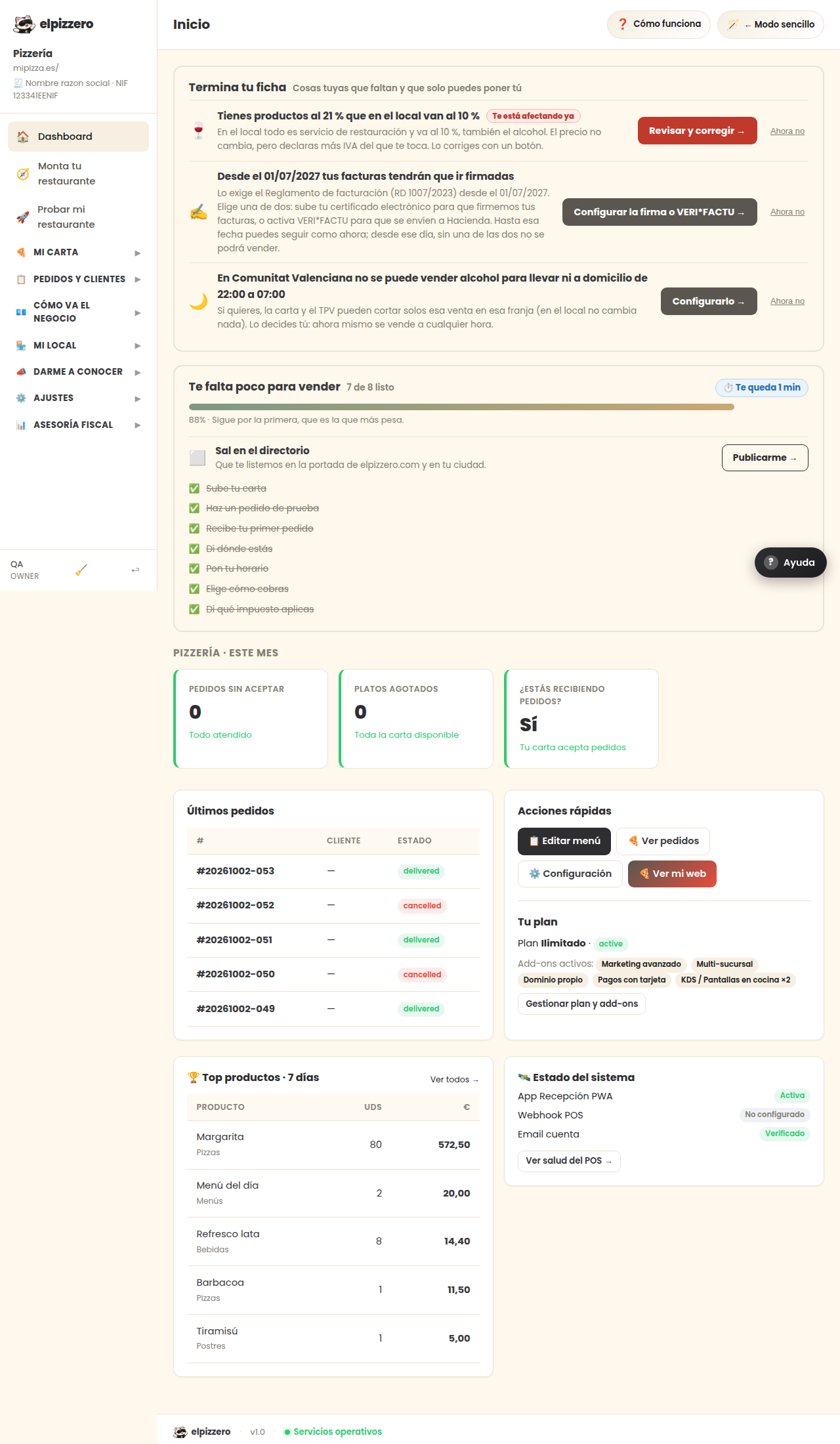
The first thing you see: what you need to sell, how the month is going, and the latest orders.
What you find here
- “You're almost ready to sell”: the list of what you haven't configured yet. It disappears automatically as you complete it.
- This month: orders and billing for the current month.
- Latest orders: the most recent ones, for a quick glance.
- Quick actions: shortcuts to the most used features.
If you just started, the important part of this screen is the list of what’s missing. And if you prefer guidance, use “Set up your restaurant” in the menu.
View all buttons and fields on this screen
What you will find on this screen
- You’re almost ready to sell
- PIZZERÍA EJEMPLO · THIS MONTH
- Latest orders
- Quick actions
- Your plan
- 🏆 Top products · 7 days
- 🛰️ System status
What each button does
| Button | What it’s for |
|---|---|
| 📋 Edit menu | |
| 🍕 View orders | |
| ⚙️ Settings | |
| 🍕 View my website | |
| View POS health → |