
Delivery areas and shipping price
Up to where do you deliver and how much do you charge for delivery? Without zones, delivery is free.
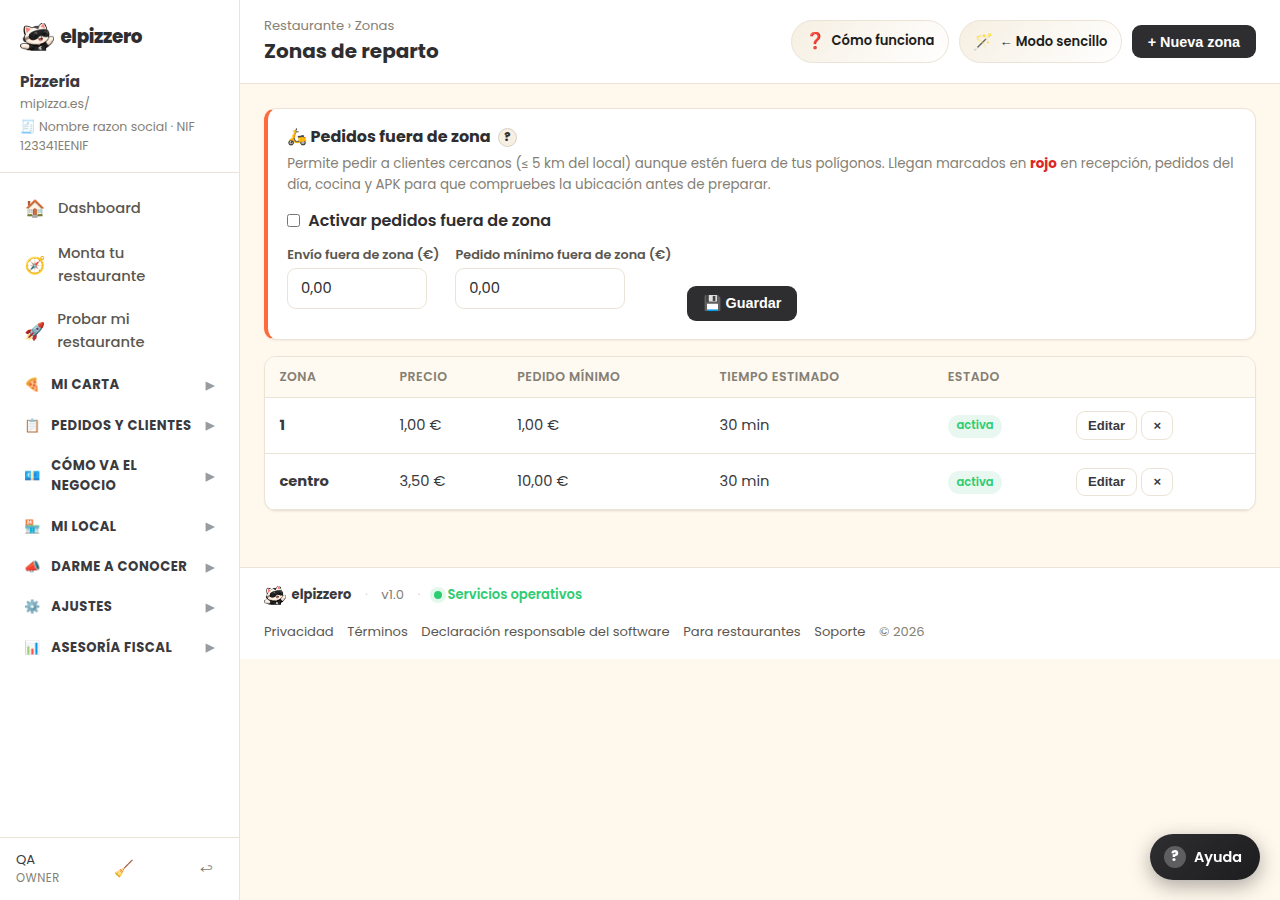
What it's for
Here you decide which locations you deliver food to and how much you charge for each. You can charge differently based on the distance: your town at 2, the one next door at 3.50.
How it works
Each area has its name, its delivery price, and its own minimum order. When a customer enters their address, the system checks which area it falls into and charges that delivery fee. If it doesn't fall into any, they can't order for delivery.
Orders outside the area
There is a switch for “Orders outside the area” above. If you turn it on, you accept orders from places that you haven't mapped out, with their own delivery price and minimum. Those orders arrive marked in red in the kitchen and on the POS, so that whoever prepares it knows that this delivery is longer than usual.
View all buttons and fields on this screen
What it asks you, field by field
| Field | Type | Detail |
|---|---|---|
| Activate orders outside the area | checkbox | |
| oz fee | text | |
| oz min | text |
What each button does
| Button | What it's for |
|---|---|
| ? | |
| 💾 Save | |
| Edit |