
Schedule: when you can receive orders
The days and hours when your menu accepts orders. Outside of this schedule, your page appears closed.
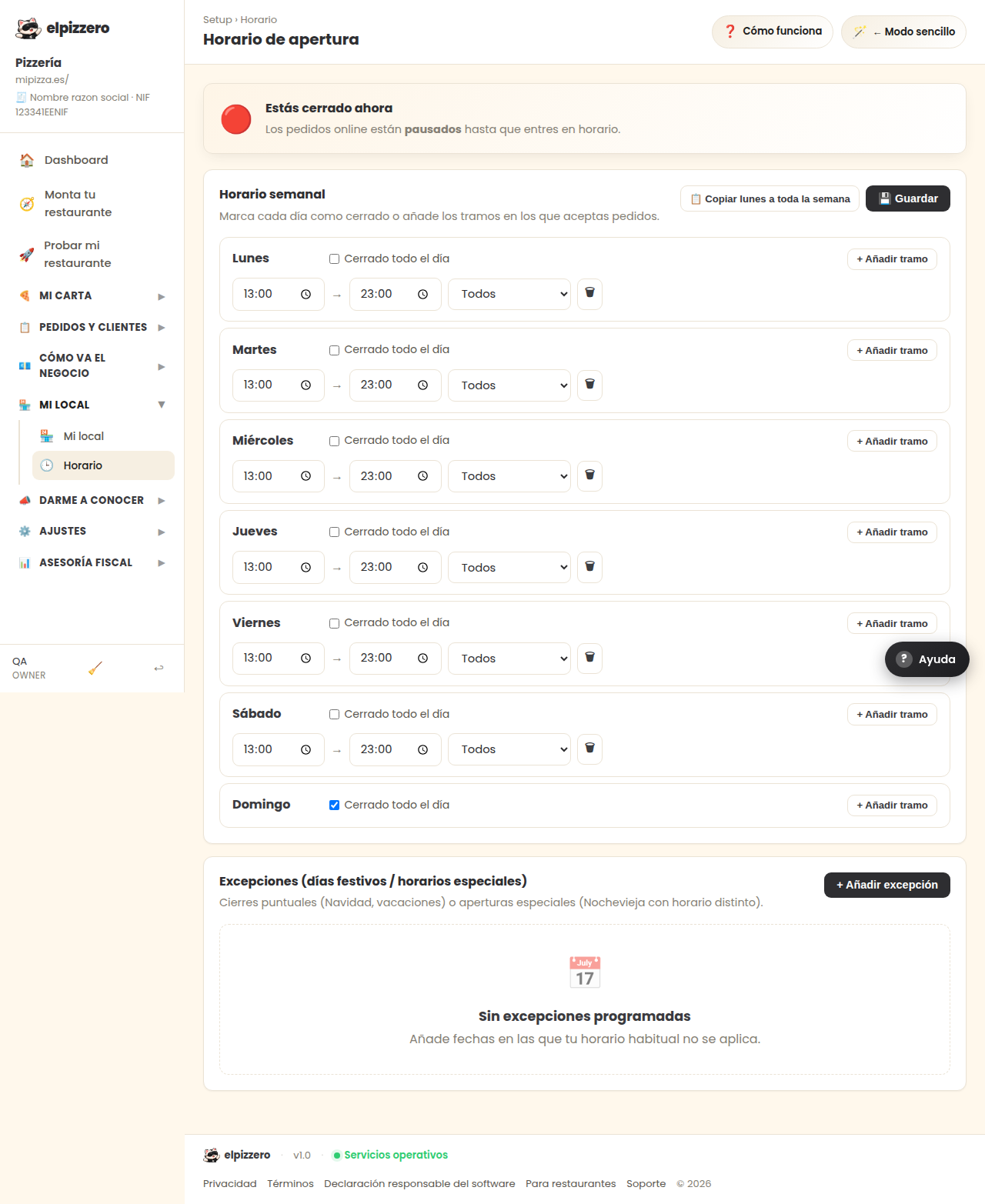
What it's for
It tells your page when you are open. Outside of this schedule, your menu appears closed and no one can order from you, even if the location is open. This is the most common mistake when starting, and the most silent: it doesn't give any error, simply no orders come in.
How to set it
- For each day, check “Closed all day” if you are off that day.
- For the others, set the opening time and the closing time.
- Click “💾 Save”. If you don't click it, nothing will be saved.
If all days are the same, fill in Monday and click “📋 Copy Monday to the whole week”.
If you open at noon and at night
Click “+ Add time slot” on that day and a second slot will appear. You can set, for example, from 13:00 to 16:00 and from 20:00 to 23:30. In between, your menu will be closed.
Different hours for pickup and delivery
Each slot has a dropdown that usually says “All”. If you stop delivering after a certain time but continue serving on-site, you can set a slot to “Pickup only.” If you don't need it, leave it as “All” and forget about it.
Holidays and special days
At the very bottom, in “Exceptions”. It serves to close a single day (Christmas, vacation) or to open with a different schedule on a specific day. Don't touch the weekly schedule for that: if you change it and forget to revert it, you'll end up closed without realizing it.
View all buttons and fields on this screen
What you'll find on this screen
- You are open now
- Weekly schedule
- Exceptions (holidays / special hours)
- No scheduled exceptions
What it asks for, field by field
| Field | Type | Detail |
|---|---|---|
| Closed all day | checkbox | repeats 7 times on the screen |
| opening time | time | repeats 6 times on the screen |
| closing time | time | repeats 6 times on the screen |
| which service it applies to | dropdown | Options: All, Pickup only, Delivery only, On-site only · repeats 6 times on the screen |
What each button does
| Button | What it does |
|---|---|
| 📋 Copy Monday to the whole week | |
| 💾 Save | |
| + Add time slot | |
| + Add exception |